Sources and program availability checked October 14, 2026 · Solar EXIT IQ editorial team
A guided DIY solar exit program combines homeowner education, a case workspace and document-preparation tools while leaving decisions and correspondence with the homeowner. It is different from a downloaded letter pack, full-service administration and legal representation.
Solar EXIT IQ’s implemented program organizes one assigned agreement into guided stages. The intended value is continuity: your documents, prepared letters and response records remain connected to the same case. It does not decide that you have a right to cancellation or perform the case for you.
- 01Confirm your case
- 02Review & organize
- 03Prepare & send
- 04Record & follow up
Start with consultation, approval and the correct agreement
An access request tells the team you are interested; it does not grant membership, charge a payment or activate a license. After consultation and enrollment, complete photo ID upload, the assigned solar agreement, your customer-specific DIY service signature, verified payment, and final read-and-accept DIY terms. Staff verify identity and case setup before full workspace access.
One purchase is tied to the licensed homeowner/household and one assigned solar agreement. Administrators verify the agreement and case identity. You cannot treat a license as a reusable tool for unrelated properties or replace the assigned agreement with another contract. Ask about separate arrangements for a separate loan or additional property.
Review the existing Guided DIY landing page for availability and the access-request form. Do not send a time-sensitive legal notice through a general enrollment inquiry.
What the six stages actually organize
| Stage | Your work | What completion means |
|---|---|---|
| Get started | Confirm household details and responsibilities | An acknowledgment, not verification of cancellation |
| Review agreement | Review the assigned agreement and source-linked passages | An informational starting point, not legal advice |
| Gather documents | Upload relevant supporting evidence | A more complete case file |
| Create letters | Choose a reviewed template and check the full draft | A prepared letter, not a sent notice |
| Track correspondence | Record actual sending, delivery and responses | A work log, not automatic company monitoring |
| Record outcome | Save and review relevant response documents | A reported outcome; documents still determine what happened |
The stages provide organization, not a timetable. Marking a stage reviewed does not extend a notice deadline, certify the other company’s receipt or establish that a debt has ended.
From case details to printable correspondence
The implemented letter workflow uses reviewed templates and verified recipient information. You choose the purpose, add accurate facts, review the complete draft and confirm it before generating a printable PDF. Saved versions help keep the preparation history with the case.
Your review is essential
- Confirm the correct company and recipient for this request.
- Check names, agreement references, property and factual details.
- Read the full wording, not just the prefilled fields.
- Verify required attachments, signatures and delivery instructions.
- Keep the final version that you actually send.
You print, sign and send the letter. Solar EXIT IQ Guided DIY does not mail it, negotiate for you or fulfill the case. A mailing label or generated PDF is not proof that a carrier accepted the item. Our letter preparation guide explains the underlying recordkeeping questions.
Actual software screens, shown with synthetic records
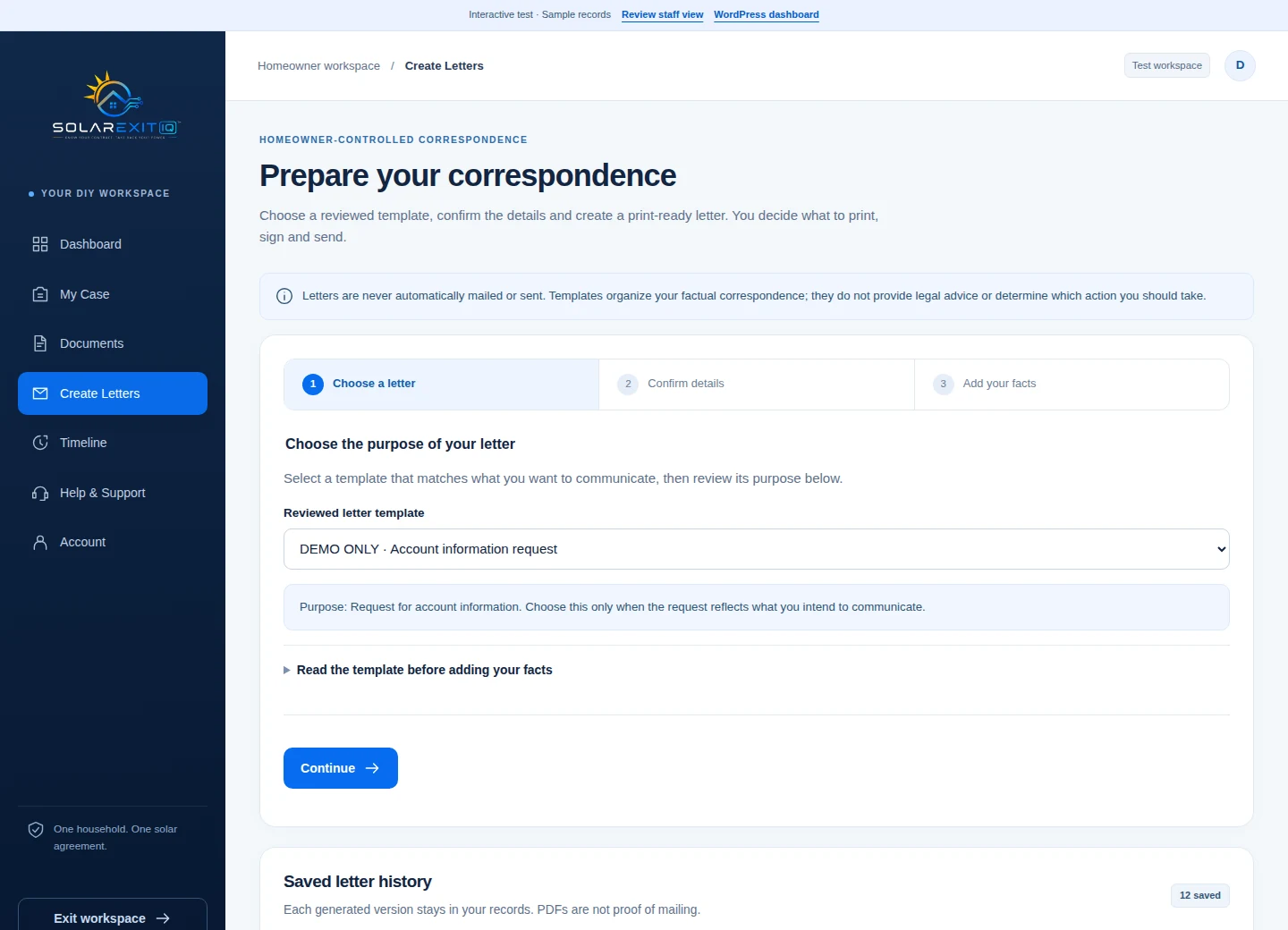
The screenshot demonstrates the interface rather than a customer’s experience or result. No case shown is evidence of cancellation. The portal’s recordkeeping tools depend on accurate information supplied and reviewed by the homeowner and authorized staff.
Keep documents and correspondence together
Use the case document center for relevant agreements, supporting records and letter copies. Record what was sent and received rather than assuming the portal monitors the provider’s systems. Keep proof of actual sending and any response outside the dashboard as part of your own important records too.
For example, if a company says it needs another document, save that request, identify the missing item and keep the response together. The workflow can make the next administrative task clearer without deciding the legal significance of the correspondence. The Resources hub can help with related contract topics.
Understand the two separate access periods
Included technical/navigation support lasts 12 months from activation. Portal access lasts 24 months from activation. Support can address using the software, uploads, navigation and printing; it does not include selecting legal claims, negotiating, mailing homeowner letters or managing the exit effort.
Export important records before portal access ends. Confirm your account dates, support scope, extension rules and record-request terms in your approved enrollment documents. Do not infer a cancellation deadline or expected outcome from either access period.
Choose another kind of help when it fits the task
A homeowner comfortable checking records and managing follow-up may value a structured workspace. Someone seeking administrative assistance can review Full Support and its agreed scope. A person who needs legal interpretation, representation or advice about a threatened claim should consult a licensed attorney.
The CFPB’s attorney-finding guidance offers starting points for locating help. Solar EXIT IQ is not a law firm. Even after purchasing software, deadlines and separate solar obligations require attention. Do not stop payments based on a software status or generated letter.
A useful first step before requesting access
Gather the signed agreement, related financing documents, a factual timeline and the question you want answered. Use the contract review checklist to identify missing records. The analyzer can suggest review topics from your responses; it does not inspect your documents or accept your case.
Read the DIY versus service responsibilities comparison if you are unsure how much work to manage yourself. Choose the service level around your actual capacity and needs.
Frequently asked questions
Is Guided DIY legal representation?
No. It provides educational software, document organization and preparation tools. Legal advice and representation require a separate engagement with a licensed attorney.
Does the portal automatically send letters or follow up with companies?
No. You review, print, sign, send and manage follow-up. Record actual correspondence and responses in the workspace.
When do the 12 and 24 months begin?
Both begin at activation: 12 months of technical/navigation support and 24 months of portal access. An access request does not start an account or those periods.
Can I activate immediately after requesting access?
No. An access request alone does not activate a license. Required ID and contract uploads, service signing, verified payment, final DIY terms acceptance and staff verification must be completed first.